Recent Updates
Don’t Read This Blog Post
Whatever you do, don't read this blog post.
While you're at it, do your best NOT to think about a giant, fuzzy polar bear. Standing on a tiny little iceberg. Floating in the ocean. Drinking a bottle of Coke.
You can't do it? (At least most of you can't.) Most of you probably pictured a polar bear... and even if you couldn't you thought about what that polar bear, standing on the iceberg, drinking a Coke, would look like.
Your subconscious cannot process negatives. If you have a sales letter with phrases like, "Don't delay" ... guess what... people are going to think about delaying BEFORE they can think about what the opposite of that means.
Jason and I are both marketing nerds but he is definitely way more of a copywriting nerd than I am. When the four of us were in Hawaii having dinner, he blurted out, "By now, you must be wondering..."
Great copywriting phrase. Not only does it make people think "by now" ... it makes sure they read the copy before that sentence. It focuses the selling on "them" and reminds your prospect that you are thinking of them.
In that same conversation we also nailed the fact that the subconscious can't process negatives. So, something you can do today in 5 minutes or less is: open up the sales letter for your most popular product... search for negative words like not, don't, can't, cannot, couldn't, wouldn't, shouldn't, stop... and rewrite them quickly.
I'm definitely not over agonizing over sales copy, but this is a quick way to increase conversions.
The other day somebody bought one of my high ticket ($97) and we talked a little bit back at forth over e-mail. His signature link led to a killer non Internet Marketing niche squeeze page with a walk-on video, great headlines, perfect heatmap positioning... all the right stuff.
The walk-on video did a very good job of convincing me to opt-in and I was about to, just out of curiosity. But one of the very last sentences in the video was: "There's no reason you shouldn't sign up."
Oops... I processed the phrase, "You shouldn't sign up" ... didn't feel quite right, and left the page seconds later.
Want to know something funny? In my Fast Food Copywriting sales letter, I used to have the word "not" in the copy 14 times, "don't" 7 times, and "can't" 3 times. I just spent 60 seconds editing them all out. I never said I was perfect, just that I can write average sales copy very quickly.
Can you take a second to check your own sales copy, and see how many "nots" "don'ts" ... "nevers"... and other negative words you have in your sales copy? (A quick way is to paste your sales copy into a text file and replace the word " not " (not including the quotes but including the spaces) with nothingness just to see how many results show up.
You're probably too embarrassed by that number to post below, aren't you?
Learn Some Self Control!
Keep reading for a 10 second exercise that will boost your productivity...
I bought a laptop before the Hawaii trip, because I've been on planes before to go to seminars and hate the waiting on the plane, where you're not able to move around much. I'd have so many ideas for articles, but all I could do was write down the chapter titles on a piece of paper. I definitely wasn't going to write out articles by hand and retype them... total waste of time and easy way to get bored.
So, I bought a laptop for the flight.
If you've met me at seminars you've probably never seen me with a laptop. That's because for me, seminars were my only downtime from computer. I don't take nights and weekends off, I sure as heck wasn't going to do MORE marketing during my only vacation. I'd queue up lots autoresponders and e-mails before the trip so my business wouldn't take a hit.
I like to sit down at my computer, get my marketing work done, then get off the computer.
So why did I buy a laptop? Wouldn't that wreck that system?
Nope... because I'm making an effort to exert some self control. I set a simple rule in my head that I'm only going to use the laptop in 14 minute spurts, to either write articles or whip up PowerPoint presentations for videos. No browsing forums or checking e-mails.
How do YOU get self control?
It's simple. Pick a task that takes up most of your time and kills your productivity:
- Checking e-mails, MySpace, Facebook, Twitter, etc.
- Reading forums.
- Watching TV or playing computer games.
- Leaving the computer too much.
- Incoming phone calls.
Then choose one thing you wish you did more every day:
- Write one blog post or article.
- Write one chapter of an e-book.
- Write one sales letter.
- Write autoresponder e-mails.
- Send a joint venture proposal.
Now you're not allowed to do that one habitual productivity-killing task at ALL (the number you chose), until you do the thing on your wishlist (the letter you chose).
If you chose "1" and "A" then your 1A productivity task is to write one blog post before you even check e-mails. You turn your compulsion into an advantage... uh oh, someone might have e-mailed me something important. There might be a pressing customer service issue waiting... better write up a blog post and PUBLISH or SCHEDULE IT (important... finish what you start) before you can check that e-mail.
Sure, you tell yourself you're only going to check for new e-mails, but you'll start deleting and archiving some, replying to others, and the next thing you know it, 30 minutes have been wasted and you still don't have that article.
Or if your big habit is checking the forums, and you have a sales letter to write, then you need to be on a 2C schedule today. Finish that sales letter and have it live on the page with the order button, or submitted to your client (whichever applies) before you check the forums.
Multi-tasking is a productivity killer. Switching gears is a productivity killer. Be aware of this, like I was when I bought my first ever laptop.
Seven Things #7: Day Job Quitting Plan
Finally, in 2008, I decided to quit my day job. I haven't quit yet because there are a few things I need to do, but I answered Eric Holmlund's day job quitting questionaire, and in the Daily Seminar I've already scheduled a video explaining the way I determined scientifically when I should quit my job.
Now on to the questions... you should answer these questions too, if you need to know if it's time to quit yet!
1) Is your job hurting you?
No, actually it includes a training budget which has beefed up my resume and is giving me the initial 3-5 years of experience I'll need if I fail and need to get another job.
2) Do you have a vision and a solid plan for your business?
Definitely. I won't go into detail but I have a few high ticket items and webinars mapped out.
3) Do you already have a written goal for quitting your job?
Yes. I'll be out after March 2009, but before the end of June 2009. I want to have $60K in savings by then but even $30K will work.
4) Are you committed to the business? (Required)
The past five years would say so! I have been working on my business during my lunch break at work, after work, and every day on weekends. My girlfriend helps motivate me, and my accountability partner motivates me.
5) What do you have to lose? (If you have little or nothing to lose, it’s a good time to quit)
Not much to lose. It might be tough to get re-hired somewhere else. I could lose my house but I have savings. Worst case scenario, I could sell off some resale rights. Worst-worst-case scenario, I could freelance to get some quick money.
6) How long will your savings last?
With my current lifestyle: 6 months. If I cut everything down to the bone, 8 months. So right now I could last till June 2009 or August 2009... just that fact alone makes it seem STUPID to keep working.
7) How much income is your business bringing in?
Last year, just over $100,000. My monthly expenses are under $4000, so I am making more than double what I need every month.
*Quit your job and go full time at the point where your business is bringing in the minimum that you need to make ends meet.
8) What are you willing to sacrifice?
I have no problem cutting back on the seminar travel or not going out as often. I
9) Do you trust your gut? (And is it usually right?)
I trust it, and it's almost always right.
10) Will you dare to do what others only dream of?
Yes. My day job makes me feel extremely isolated. I want to hang out with friends more often, I want to get a laptop and hang out with my nephew before he grows up.

Can you do me a favor and answer any of these questions for yourself? You don't need to answer every single question, just the one that's most important to you.
Sorry, But You’re An Idiot!
A while ago I dealt with a guy on a public message board (not the one I usually frequent) who said something along the lines of this:
I've never seen a sales letter actually implement any of this JavaScript or PHP interactive sales letter stuff.
Every time I see one of these sales pages, I check out the site for every person leaving a testimonial. The truth is that nobody is actually using this stuff... is it a case where the emperor has no clothes?
What a dumbass question!
What proceeded was, several of us replied to him but he seemed to be off in his own little world.
Guess what, if you go to the Clickbank marketplace and choose the top sellers in ANY niche... most of them use some sort of pop-up, lead capture, survey, peel away ad, walk on video, or chat agent setup.
Most of what goes on is invisible to you because they'll use all kinds of personalization, landing pages, dynamic autoresponder follow-ups, sublisting, and all that.
If you are trying to tell me that adding PHP has no affect on your sales, or hurts them? Gimmie a break!
You can still sell a product with good copy and no PHP and JavaScript tactics. But good copy plus PHP scripts? Unstoppable!
You could add an exit pop-up to turn lost sales into opt-ins. Or simply add a countdown timer or interactive sales letter... it's up to you.
Seven Things #6: Product Funnel
In the Daily Seminar membership site Jason and I launched yesterday, we're going to be opening up parts of our business that we don't like to give away for free...
Here is my long term business plan... otherwise known as a map of all my current upsells:

It's a slightly out of date map but you get the idea.
That chart tells me exactly what I need to work on next.
I update it regularly (using Visio) but I used to do the same thing with my whiteboard.
Each of those boxes represents a sales letter. When they try to order, the arrows represent the different upsells that I present to them. So they can either: yes, I want to order this package... or say, no, I want this bigger package, and get moved to the next box.
As you can see, the PHP in a Box, Full Blast PHP, and Guerilla PHP stuff is on the bottom. Three packages around $100, upselling into a $200 bundle and then up to a $300 bundle.
I've blurred out the stuff that's not released yet (most of it is very close to being released). Obviously it all points to a giant package in the middle that I will price at $1000.
The ovals represent surprise bonuses I still need to integrate into my products. I'm applying the Ben Prater Refund Reducing Formula on those as loyalty bonuses... autoresponder follow-ups timed a week or two after a purchase. I offer that bonus in exchange for a testimonial about the orignal product.
The dotted lines represent upsells that I haven't connected yet. If I was working and was in a copywriting mood, I should probably spend 30 minutes writing the 1 page sales letter that upsells Full Blast PHP into the PHP in a Box plus Full Blast PHP bundle.
The white boxes mean they are products without video. The red boxes mean those products do have video. Common sense tells me that if I am in product creation mode, I should finish up the videos for Simple PHP 1, 2, and 3.
Because THAT means I can upsell visitors to a $100 product, upsell those to a $200 product and finally a $300 product just by writing a couple more pages of sales copy.
If a box has an "F" letter it means I am satisfied with the number of automatic followups that buyers of that product receive. When I am in followup creation mode I take one quick look at this chart and work on followups for a box missing an "F."
If a box has a "T" it means I'm satisfied with the number of testimonials for that product. If I feel a product is lacking in testimonials I can blast a quick mailing to my sublist for that product, check my old threads or blog comments to canniblalize into testimonials. Maybe even single out some of my active buyers and interview them over e-mail, and turn that into a testimonial.
I teach in Fast Food Copywriting that the only reason you are after testimonials is for proof. You don't need testimonials to sell a product, only to give proof.
Each box also has a bount of the number of scripts, price, video running time, and download size so that I can easily total them up in any bundle to give a "thud" factor -- when I say a product has 2 gigabytes of content, people say, "Wow!"
Read a Sales Letter Aloud
Are you still participating in the daily video challenge?
If you missed out on it, the task is you just record one video every day. It could be a live-action video, it could be a Camtasia video. It could be just 5 minutes if you want it to.
Many many months ago, my friend Steven Schwartzman paid for someone to create a YouTube video out of his site... all he did was record a Camtasia video reading the sales letter for a few minutes.
Due to the rules of the Daily Video Challenge, you're not allowed to do that.
On the plane ride back from Austin, Texas in April... returning from the Warrior Event... I copied a few peoples' WSO sales letters by hand and it works like MAGIC!
Record a Camtasia video of you reading a sales letter aloud... a sales letter of either a competitor's product, or a product in a similar niche to yours.
It will also help with your speaking skills. At one point, recorded a PowerPoint Camtasia presentation for Kevin Riley's Recipe for Post Product Launch.
Guess what that means?
- I now have a web-based video presentation that I loaded into an autoresponder series. I'm using Ben Prater's method of sending out regular follow-ups to reduce refunds.
- I also have an audio product. Camtasia allows you to export just the audio of a presentation into an MP3. I separated the audo into two folders because audio CDs only hold 74 minutes of audio.
- I can easily produce the Camtasia files as a DVD if I want to.
I used it as an incentive for people to purchase from me as an affiliate. If it brought me in enough profits, it would justify buying resale rights... but it didn't, so I didn't buy the rights. That's a heck of a lot better strategy than simply blindly buying up rights.
When you buy up resale rights, you can stick in your own upsells, and create your OWN affiliate program...
In our Daily Seminar membership, we're buying up the best resale rights possible to teach you the basics... while the content we create ourselves, focuses on the more advanced stuff.
Hint: This month in the seminar, I'll be posting a very special paid version of the Daily Video Challenge, with actual step by step tasks for you to work on the entire month.
Leave your ten comments for me and Merry Christmas!
Seven Things #5: Continuity Not Memberships
Reminder: Daily Seminar still has seats available!
Although Dr. Mike Woo-Ming wasn't the nicest guy at the Warrior Event in Austin, he did have a lot of really good information.
He gave me a really cool AdWords idea: Instead of blindly bidding on a keyword, he chose the top ten sites in the Google search results for that keyword, then placed AdWords ads and limited them to appear on AdSense ads for those pages that appeared in the top 10.
Not just those domains... those exact pages.
At the end of his talk, Mike said, "I don't do memberships... I do continuity." He didn't explain himself and I had to ask him about it during the hotseat Q&A session on the final day.
Here's the explanation: Running a membership site is too much work. If you don't provide new content to a membership site every couple of days, people will complain and unsubscribe. If you want a recurring income you can still promote membership sites... as an affiliate. Don't be responsible for the membership content.
Before coming to the event, I was against starting a membership site. During the event I was ready to start my own membership... but that little bit talked me out of it.
Now, I'm back in! Why?
Jason and I have enough content. (I don't think I could start a membership site on my own.) We have a huge stockpile of content ready to go, we got a lot of practice pumping out products quickly from our Product University class.
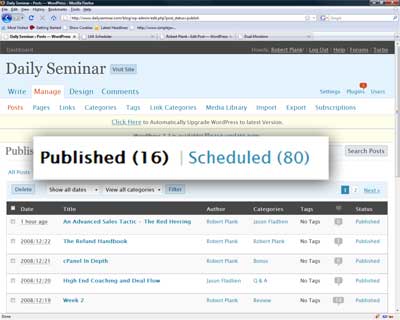
Look at that, 16 live posts and 80 scheduled posts... for a total of nearly 100 posts! I am finishing up March 2009 this week. That's the only way to do it... knock out one month completely, knock out the next month completely...
Our original plan was to kill ourselves and spend 1 week out of every month recording 25-ish interviews. That would have been stupid and would have burned up our content too fast.
Instead, we scheduled the interviews once per week. To fill out the rest of the week, Jason and I each recorded some 20-minute videos on our own. (When making the bonus materials for Product University we got a lot of practice pumping out 20-minute video products quickly.)
So, our formula consists of: Monday, a video by me... Tuesday, a video by Jason, Wednesday, one of our interviews converted into video... Thursday, some product we had secured the rights to... Friday, a question and answer session... and if we still had stuff to give, we'd fill up Saturday and Sunday too.
Why not join to see for yourself how we structured it?
We've filled up every single day of the month so far. Since it's all scheduled several months ahead of time, all we REALLY have to do is answer blog comments. We've had a couple minutes every day to fill up a Saturday or Sunday slot too.
We also know the demand exists. Our own product creaton low ticket items sold well. Our high ticket items sold well. Now it's time for the next step (recurring).
One last thing. You don't have to kill yourself when you make a membership site. Just figure out a way to schedule content to get released most days of the week (like on a blog).
We almost killed ourselves trying to come up with content the first time around. When we did the Product University class, we hosted TWO webinars per week when one would have been fine.
Heck, how much PLR or MRR content is sitting on your hard drive? Could you assemble some of that into a membership site?
Or maybe you just freelance. If you are a successful freelancer you know that your best business comes from repeat clients... so why not get them in a membership site? If you're a writer, guarantee a certain number of articles per month. If you're a copywriter, guarantee a number of autoresponders, solo ads, or sales letters per month. And so on. Why go to all that trouble of begging for money every month?
Add ten comments to this blog post for the next big thing I changed this year!
Seven Things #4: Joint Products
During lunch at the Warrior Event in April, I was with the group at a really cool Mexican restaurant and I sat next to an attendee who was an NLP copywriter.
No, it wasn't Steven Schwartzman, actually I can't remember the guy's name. He was new to the warriors but he really knew his stuff. (He taught coaching in the dating and hypnosis niches).
I explained to him that one of the weakest points in my business system is joint ventures. I am not a people person. Even though I have a large buyers list and people like Eric Louviere said I was a really popular, I didn't believe him because I don't have any really good contacts.
Some of those people on my customer list include Allen Says, Paul Myers, Willie Crawford, Marlon Sanders, Marc Harty, Mike Filsaime, Armand Morin, Tony Blake, Ewen Chia, David Valleries, Dave Miz, Kevin Riley, Paul Kleinmeulman... I could go on.
I'm still a nobody because these guys are flooded with joint venture requests... I don't offer any high ticket, high commission, recurring, multi-tier products. I still have a long way to go.
This NLP guy gave me a cool idea to start small... and that's to create joint products... but not in the usual way.
As Willie Crawford said in his talk about joint ventures at the seminar, you need to hand everything to them on a silver platter.
NLP guy's suggestion: Ask the joint venture "target" to ask his list for their best question about your topic... whatever topic you are an expert in.
Then, answer those questions and give it to that list owner as a product... that they have exclusive rights to... that ends in a call to action to buy YOUR product, with their affiliate link.
You could host a teleseminar or even just record a skype conversation where you discuss the answers. Maybe cut them up and make a podcast.
Transcribe them so you have an autoresponder series.
That's how you create a joint product.
That's what Jason Fladlien and I did later this year after the Philadelphia JV Alert seminar in June. We recorded a bunch of Skype interviews... and guess what... we'll be adding them to Daily Seminar every single week.
Have you created any joint products? Do you have any joint product tips to share?
Dual Monitors
One thing I forgot to mention the other day about my Camtasia PowerPoint process is that I now have a dual monitor setup:
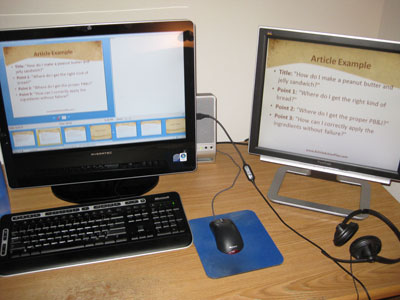
On the left is my new computer that came this week. It's one of those iMac ripoffs where the whole computer is contained within the monitor. It's an AVERATEC F1 D1002UHCE-1.
2.4 GHz Intel Core 2 Duo E4600, 2 GB DD2 memory, 320GB SATA hard drive, 22 inch monitor, Nvidia GeForce 8400 256 MB graphics card, built-in wifi, memory card, DVD burner, webcam, TV tuner. I upgraded from a Shuttle, little toaster shaped computer I bought a couple years ago.
I like tiny computers... less clutter.
But I plugged my 19-inch monitor from the old computer into the back and now I have a second monitor. Great for recordnig those Camtasia PowerPoints as you can see in the picture.
I configured PowerPoint to display the actual slide show on the right monitor, and show "presenter view" on the left so I can see what slides are coming up next.
Yep, if you go to "Set Up Show" in PowerPoint you can not only specify which monitor will display the presentation, but also what resolution to resize it to... I tell it to resize to 640x480 for the presentation.
What's more, if you use the REAL PowerPoint (not OpenOffice like some people named Jason) and you install Office first, then Camtasia, they will add a little button to the "Add-Ins" tab of Camtasia to start the slide show and start recording with one click.
I click ONE button, it resizes my second monitor to the low resolution for recording, starts the slide show, and starts recording. As soon as the slide show is finished, it resizes the monitor to the old resolution and asks where to save the Camtasia recording.
Super cool, right?
The one-click thing might sound stupid, but I'm recording so many videos for the Daily Seminar that I'm at the point where I need it.
I've used dual monitors at work for over a year now and it makes you way more productive in other ways. You can code in one window and read instructions in the other... edit graphics in one window and write in a document on the other. But Camtasia recording is by far my best use for dual monitors.
Do you have a dual monitor setup? If you don't, why not? What desktop setup do you have to get the most productivity?

