Recent Updates
Dual Monitors
One thing I forgot to mention the other day about my Camtasia PowerPoint process is that I now have a dual monitor setup:
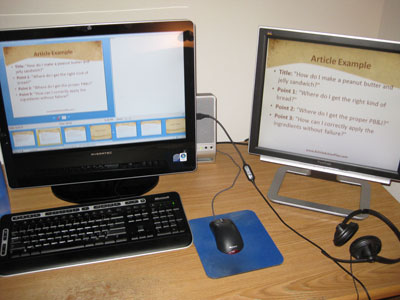
On the left is my new computer that came this week. It's one of those iMac ripoffs where the whole computer is contained within the monitor. It's an AVERATEC F1 D1002UHCE-1.
2.4 GHz Intel Core 2 Duo E4600, 2 GB DD2 memory, 320GB SATA hard drive, 22 inch monitor, Nvidia GeForce 8400 256 MB graphics card, built-in wifi, memory card, DVD burner, webcam, TV tuner. I upgraded from a Shuttle, little toaster shaped computer I bought a couple years ago.
I like tiny computers... less clutter.
But I plugged my 19-inch monitor from the old computer into the back and now I have a second monitor. Great for recordnig those Camtasia PowerPoints as you can see in the picture.
I configured PowerPoint to display the actual slide show on the right monitor, and show "presenter view" on the left so I can see what slides are coming up next.
Yep, if you go to "Set Up Show" in PowerPoint you can not only specify which monitor will display the presentation, but also what resolution to resize it to... I tell it to resize to 640x480 for the presentation.
What's more, if you use the REAL PowerPoint (not OpenOffice like some people named Jason) and you install Office first, then Camtasia, they will add a little button to the "Add-Ins" tab of Camtasia to start the slide show and start recording with one click.
I click ONE button, it resizes my second monitor to the low resolution for recording, starts the slide show, and starts recording. As soon as the slide show is finished, it resizes the monitor to the old resolution and asks where to save the Camtasia recording.
Super cool, right?
The one-click thing might sound stupid, but I'm recording so many videos for the Daily Seminar that I'm at the point where I need it.
I've used dual monitors at work for over a year now and it makes you way more productive in other ways. You can code in one window and read instructions in the other... edit graphics in one window and write in a document on the other. But Camtasia recording is by far my best use for dual monitors.
Do you have a dual monitor setup? If you don't, why not? What desktop setup do you have to get the most productivity?
Seven Things #2: Advertorials
In April 2008 I attended my very first real seminar. We socialized at the bar every night (Thursday night through Sunday night) and one of those nights, starting drinking in a group of people that included Bruce Wedding -- copywriter!
Bruce is slightly ahead of where I'm at (he does $4000 copywriting jobs) and he spoke a little bit about how he has been trying advertorials.
An advertorial is exactly what it sounds like: an ad that teaches some kind of information.
I wrote a sales letter a couple of days after returning from the event and it was an advertorial. I wrote it like an action-packed article and it ended up being a 20 page sales letter.
If you know my PHP products, I sell a package of seven scripts... each script contains source code, PDF instructions, and a how-to video.
I was able to split the long sales letter into seven sub-letters. There was an overarching story throughout the whole thing, but each sub-product had its own story.
I registered seven extra domain names (each for its own script), put each sub-page as its sales letter, put up an order button and upsold it all to the main product.
Don't forget, I also wrote solo ads and setup affiliate programs for each product.
A lot of work, but there you have it... 8 products!
Tomorrow, Jason Fladlien and I are launching the Daily Seminar where we give advice about how we create products quickly, write sales letters quickly, sell without selling, and more stuff... we give advice every weekday!
Gimmie ten comments down below and I will share the next tip with you.
PowerPoint Camtasias
I can't believe I haven't given away this procedure on the blog before. I think I've mentioned it in passing once or twice via comments, and explained it in the private Product University membership last month, but I'm sick of repeating myself, so...
Here is the formula to turn an audio product into a video product. It requires Camtasia ($299 with 30 day free trial) and Microsoft PowerPoint (OpenOffice is free, or you can get the downloadable home edition of Office 2007 for only $80 on Amazon).
Let's pretend you have an audio product that's 27 minutes long.
1. Open up a blank PowerPoint and start playing the audio in your MP3 player. (The default black and white theme will work fine for this.)
2. Fast forward to 1:00 (one minute) in the audio and start listening. Type in the main point of 1:00 to 1:59 as the headline of the slide, and type three quick bullet points of 1 to 6 words each. (Pretend you're back in school and taking quick notes).
3. When the audio passes 2:00, skip to slide 2 by hitting ctrl+enter. Type in your headline and three bullet points for 2:00 to 2:59 in this.
4. Repeat for the duration of the audio. The beauty of this is if you need to stop at say, 15 minutes, you can come back and you'll know exactly where you left off. By the end of this, your 27 minute audio now has 27 slides.
5. Insert a slide in front of all the other slides in the PowerPoint. Change its layout to title slide, and type in the name of the product and the author.
6. (Optional) Edit the master slide and insert your URL at the footer, that way your URL appears on all slides.
7. Select all slides. In PowerPoint 2003, go to Slide Show... Slide Transition. In PowerPoint 2007, there should be an Animation tab. UNCHECK the "advance slide on mouse click" box, and click the "automatically after" box, then type in 01:00 for one minute.
8. Resize your screen to 640x480 resolution, fire up Camtasia Recorder and set it to capture WITHOUT sound, full screen, at 1 frame per second.
9. Start the slide show and hit record (once you get good at this you can actually do it in one click with the "Add-Ins" menu but let's not get ahead of ourselves). Leave the computer, because if you click around on other windows, even if you have multiple monitors, it will mess up the slide show. Don't take too long of a walk because you'll want to be there to hit Stop as soon as the slide show goes black.
10. Stop the slide show, save the camrec, open up Camtasia Studio to edit your recording and import both the camrec video and the MP3 audio. Add a 2nd audio track and drag the MP3 in as the audio.
Congratulations, you've just turned your 27 minute audio into a 27 minute video, and it only took you 27 minutes to listen to the audio and about 2 minutes to get it into Camtasia Studio.
Now export it to an SWF 1 frame per second video if you want to show it on the web. If you want a downloadable version, I prefer to export to WMV. Camtasia 5 has a checkbox that will also export into an iPod version. Cool beans!
Guess what, you can also export the PowerPoint slides into PDFs as well. You've just given yourself an excuse to charge $10 or $20 more for your product.
Don't even have an audio product? Read your book aloud, word for word. Record it into Camtasia and export just the audio (I don't even bother with programs like Audacity).
This is how I make audio products. I'll record text word for word into audio, then PowerPoint it to make it a video.
Most of the time I'll do it backwards, and write PowerPoints where 1 slide = 1 page, then record the PowerPoint with Camtasia running, capturing audio as I read each page aloud, and change the slide when I turn the page.
Then export the PowerPoints into PDF, camrecs into WMV, MP3 and iPod... $17 e-book becomes a $47 video product.
For the products Jason and I are creating for the Daily Seminar, most of the time we don't even bother with the text... who has time to write when you are recording a 20 to 60 minute seminar every day? Just record Camtasia PowerPoints and export video plus audio plus slides. If people really want text, we'll transcribe them, but those costs really add up.
What are your thoughts? Do you use something similar to my PowerPoint Camtasia method? Do you have an even BETTER system than me? Please tell me to know, I'm dying to hear about it!
Seven Things I Changed This Year
Guys, I'm launching a membership site next Monday (December 15th) at 10:00 AM PST. Just wanted you to be aware.
2008 was my most important year in marketing. I changed a heck of a lot of things and actually took my marketing seriously.
The first thing I changed: a longer stream of upsells.
I've only started using upsells this year. An upsell is where you sell a low-ticket item for $27 and just as your visitor goes to order, you give them a choice to either pay the $27 or $97 for a higher ticket item.
Even better, get the $27 order first and on the thank you page, give people the choice between clicking over to the download or giving you the extra $70 for the full package.
Attending seminars made me realize how short sighted I was. Many of the attendees sell products in the $600 range and upsell coaching packages all the way up to $10,000.
As soon as I arrived home from my 4 hour flight and 90 minute drive from the airport, I changed many of my upsells that went from $27 to $97... to upsells that went from $27 to $97... to $197... and finally to $250.
I would bump the upsell to $500 or more but Clickbank has my price limit set at $250.
Do you have an upsell for your product? How many steps?
Please fill up this entry with ten comments so I can share the next big thing I changed this year...
What Membership Software Do You Use?
Do you run a membership site?
What software, plugins, and payment processors do you use for it?
I just setup a real recurring membership site. No more of this password protected blog stuff. I used aMember and WordPress, with Clickbank as the payment processor.
I was really surprised how many plugins are available for this stuff now. Even a year or two ago, you had to modify code and do custom scripting... "duct taping" the scripts together. Now you just install some plugins.
Pretty freaking cool!
I used a blog because I wanted to stockpile a bunch of content up. aMember has the most support (I'm a member of Membership Academy so that helps.)
And Clickbank? If you read my Membership Sites on Crack report, you'd know why I chose Clickbank. Affiliates (60% commission on a recurring product) plus the escape plan. If I can get enough content piled into that membership site so that I have a year's worth of content in advance, you better believe I'm selling it off.
Do you run a membership site? What software do you use to run it? Membergate, aMember, Visiongate? What processor... PayPal, Authorize.net, Clickbank, PayDotCom, 1ShoppingCart? How do you like it?
Please, show off the sales letter to your membership site as well since those can be tricky...
Recession?
What are you working on this week? I'm cranking out a bunch of content for a new membership site...
Lots of marketers the past couple of months are using the economic recession as a hook to sell their stuff. "This system will help you profit in a recession..." I'm sure you're tired of it. You can't have a Unique Selling Proposition if it's not unique!
It's not just the internet marketing niche either. I got this e-mail from Experts Exchange (a programming forum) a few weeks ago:
"If you had invested in the S&P 500 just before Thanksgiving 2007, and cashed out just before Thanksgiving 2008, you would have lost 41% of your money."
Boo-frickin-hoo. I lost $30k in cash to the stock market the first month of this year. The value of my home has dropped $137,000 in the past 5 months on a city block where at least 30% of the homes were in foreclosure when I moved in.
One of my relatives was laid off this month, and you know what he immediately did? He didn't feel sorry for himself -- he started looking for another job. He has a savings account that will last him a little while and doesn't have a ton of debt that will eat him alive.
Another friend of mine just bought a brand new car and a house for his wife and kid, neither of them are college educated, they work "average" jobs and they can actually afford the payments.
For my business partner and I, 2008 was our most profitable year ever. I just made close to $5000 selling a 7-pack of PHP scripts, and another $4000 before that selling a 23-page PDF report, using minimal outside advertising. It was almost 100% in-house e-mail marketing. He is close to $100k in income for the year.
We both bought homes this year, and we're both taking our girlfriends to Hawaii for New Years at the end of December.
I don't have to tell you about how there are more cars on the road, more people in lines at stores and in the movies now than ever...
The whole point of a "recession" is to weed out the weak businesses. You can either watch the news way too often, believe the world is going to end tomorrow, and let it depress and demotivate you. OR you can realize that there are people out there giving up (just because they hear bad news) and you can get ahead of them.
You might have already read the story below. It's "The Man Who Sold Hot Dogs!"
There was a man who lived by the side of the road and sold hot dogs.
He was hard of hearing so he had no radio. He had trouble with his eyes so he read no newspapers. But he sold good hot dogs.
He put up signs on the highway, stood on the side of the road and cried, "Buy a hot dog, mister?" People bought. He increased his meat and bun orders. He bought a bigger stove to take care of his trade.
He finally got his son home from college to help him out. But then something happened. His son said, "Father, haven't you been listening to the radio? Reading the newspapers?
"There's a big depression. The European situation is terrible. The domestic situation is worse."
The father thought, "My son's been to college, he reads the papers and he listens to the radio, and he ought to know." He cut down on his meat and bun orders, took down his advertising signs, and no longer bothered to stand out on the highway to sell his hot dogs.
His hot dog sales fell almost overnight. "You're right, son..." The father said to the boy. "We certainly are in the middle of a great depression."
D'oh!!
Do you belong to any clubs or memberships to network and get more ideas, do you know what you want in 2009 and do you know what you have to do to get it? Heck, what can you do differently in the next three weeks that hasn't worked for you this year?
Please comment below, and let me know what you are working on for the remainder of this year. And guys, PLEASE don't turn this into a political or economic discussion. The whole point is that politics and economics won't affect your business unless you let it. Your bad attitude will KILL YOU if you let it.
Hypnotic PHP
I just launched Hypnotic PHP on Thursday, so how did it do? $3,308 in 24 hours... and $4,574 in 48 hours, that's how it did!
Out of the 962 people who actually clicked through my e-mail, 211 bought. That's a 21.9% conversion rate on my untested, half assed full of typos sales letter that I wrote in a few hours.
From those $17 purchasers: 141 of them accepted my $7 upsell containing 7 more videos and scripts (Urgency Tactics) ... 66% conversion rate there.
So the grand total was 352 sales for a total of $4,574... $4,320.56 after fees, but the number of sidetracked sales of other products, made up for those PayPal fees.
So why the heck didn't I do a dimesale or anything like that for this launch?
You don't ALWAYS need to repeat the same freaking exact process when you launch a product!
I used to have people complain about my dimesales (because they couldn't get in at a low price fast enough), this time I had people complain about the LACK of a dimesale (because he's used to getting in at a low price).
I haven't given up dimesales, but the effort that goes into pre-selling my list a few days ahead of time is a lot more valuable than doing all the steps to make sure my dimesale works correctly.
You don't ALWAYS need a dimesale offer, just some kind of scarcity. Mine was really low-key... you get in now for $17, but after 48 hours it's $27. No countdown timer, no ticker counting the number of sales... just a simple offer.
If you were on my list you got the Email Marketing on Crack videos that explained it...
- Day 1: Tell your list something's going on sale at such and such date and time.
- Day 2: Explain the biggest benefit. (48 hour notice)
- Day 3: List out the rest of the benefits. (24 hour notice)
- Day 4: Tell them you launched it. (3 minute notice)
- Day 5: Tell them it's the last chance to get in before you close the doors or raise the price
That's it! It's not rocket science. I only started applying this after people told me the dimesales didn't give them time to read the sales letter.
But when I replaced the dimesale with standard scarcity, I still made the same amount of money with less customers -- which means less support.
I know some of you guys might cry and say, "Yeah right, you couldn't have done that without your big mailing list..." How do you think I built that mailing list up in the first place? Product launches on forums to build my list.
One final tip about pre-selling your list: Have the product ready to go before you start pre-selling it. I see lots of guys promote first and then end up having to push the launch date back.
But me, I used those few extra days to whip up an irresistible upsell offer (the extra $7 videos and scripts). 90 minutes of work netted me an extra $707 on that promo. 🙂
Am I Evil For Working At a Day Job?
My question to you today is: does working at a day job make me evil?
I have been balancing the day job and internet marketing thing for years. It's not that bad. I'm getting my first 3-5 year computer programming job on my resume, lots of free training that would otherwise cost $5000, really good health insurance, and a reason to get up in the morning.
I don't always work 9-to-5 hours. Some days I work 6AM to 2:30PM, or 10AM to 6:30PM. It's also not the most challenging job. I don't have to work overtime, I'm not on-call, I don't take my work home. So I'm free to do internet marketing stuff after work, during lunch, and on weekends.
Quick Story:
Sometimes I forget to pick up my paycheck at my day job. Last month when I went to the receptionist to pick it up, one of my co-workers, a really cool woman in her 40's, noticed I'd taken a while to pick up my check.
She commented, "Someone else must be making those Mustang car payments..."
I told her nope, I pay for my car, but I wasn't making payments on the car... I bought it for $20,000 in cash last year.
She was surprised. I shrugged and said I'd saved up some money. I forgot to add that I own a home at age 24, or that I pay double into my principal every month.
I also kept quiet the fact that I'd launched a product the night before, and made more in 90 minutes than she made in 30 days.
How about the fact that I dropped two months worth of pay at that job for a one week vacation in Hawaii during the winter break?
No one at work knows my secret, that I make more than my boss, his boss, and his boss. Out of 800+ employees at my place of work, the only people who take home more money than me are the president and his 10 vice presidents.
When do you think I should quit?
When I have a year's worth of income in savings? Don't give me that, "Quit when your internet job has replaced your day job" line. I did that years ago.
I'm not going to be one of those guys who quits without health insurance. When did you quit and do you have health insurance? Who is your provider?
Once you lost that "time crunch" to get back to your day job, did it kill your productivity?
I am completely lost here... I had planned on being self employed right out of college but this REALLY nice and easy day job fell into my lap. Some days it keeps my busy, some days I get bored and wish I could take a road trip or something.
Stay or quit? Please tell me in the comment box below. If I don't get ten replies maybe I'll just quit regardless.

