Recent Updates
Ten Testimonial Rule
If you've been following my blog at all then you've probably heard of the ten comment rule... any time I make a post, I ask for 10 comments from my readers... or I'll stop posting forever.
I just applied that to my marketing to gather testimonials for a product.
Nope, I didn't offer a bribe for testimonials, I didn't give away free copies in exchange for a testimonial. (Good way to make sure you never hear from those people again.)
I simply said: I need ten testimonials from SOMEONE... any of my current customers... for version 1.0, and I'll release version 2.0 to EVERYONE.
I Had My Ten Testimonials Within 48 Hours!
It's tougher to get ten people to do work, even if it's 30 seconds of work (writing a testimonial), than it is to get them to pay you money.
I brought in ten sales of Action PopUp no sweat, just by mentioning it in a blog post. I wanted reviews, not sales.
The only thing I needed to do was: end my blog post with a clear call-to-action (what action I wanted you to take), and my goal (what had to happen for the challenge to end).
It's Not Difficult, But So Many People Miss That Point
You have a blog with zero comments on every entry, end the blog post with a reason you want people to leave a comment. End with a question. Give people benefits about why they should leave a comment... what's in it for them?
Use your blog to build a list and send those people to new posts when you write them.
I'll see marketers add a FeedBurner chicklet to their blog, so they've built up their RSS subscribers... but they can't e-mail them... gross! The only contact they have with these people is when they add to the blog.
Now you can't tell your readers... check out this post one last time if you haven't left a comment yet.
You can't follow-up and market to RSS subscribers the way you would to an e-mail list.
To be honest, if I didn't get my 10 testimonials by today, I would have asked my list again... I would have hit the weekday crowd instead of the weekend crowd. I would have put up a talking head video begging someone... anyone... to leave me a review.
With every blog post you should be "selling" some action that benefits you at the end. Leave a comment under the blog entry, or visit the URL I'm talking about. One of those two.
If You Don't Think You Can Get Ten Testimonials...
Try a "five testimonial" rule. You only need five testimonials to release the next chapter, update the next version, launch the next product... whatever the goal is.
Have a clear call-to-action... don't say, "Testimonial please." Say, "What was the one thing you liked the most about it? On what URL did you set it up? What was the one stumbling block that ALMOST didn't get you to buy and how did you overcome it?"
Interview your customers one on one via e-mail and use their responses to piece together a testimonial. After I got my 10 testimonials I went back through all my e-mails, blog comments, and forum posts and pieced together an additional 7 testimonials for a total of 17 testimonials on that page.
Oh yeah, I released Action PopUp 2.0 to all version 1.0 buyers so you can add popups to WordPress blogs with just a few clicks... thanks for the testimonials I needed. Even Michel Fortin posted that blog entry to Twitter.
Was that ten testimonial rule a waste of time? No one needs a call-to-action at the end of every blog post, right? I bet your blog is chock full of zero-comment entries with no call-to-action in sight... am I totally right or am I just a jerk?
Please, answer me below because if I don't get ten comments under this entry... I'm moving this whole site into a paid blog. 😉
Action PopUp 2.0
This message is for my Action PopUp customers only... you need to read this if you want an updated copy.
As you know, exactly one year today -- on August 15, 2007 -- I released the first version of Action PopUp, the first popup ever designed for opt-in forms.
It's an unblockable on-exit lightbox popup that submits your e-mail subscription form in the background... so you can place them anywhere and not lose a sale.
Guess what... I'm releasing version 2.0 of the product. It still has all the cool pop-up features you've grown to love: you can customize colors, size... and show some crazy unique special effects...
Now it also works as a WordPress plugin! You upload a folder and activate a WordPress plugin, and you can create just about any kind of popup just by clicking around.
No editing code or config files... just clicking around on stuff.
If you know me then you know I give free updates for life on all my products.
So how do you get a copy?
Let's call this the ten testimonial rule (instead of the ten comment rule)...
I need 10 reviews for Action PopUp 1.0 for my customers, and then I'll release version 2.0 to everyone.
If you own Action PopUp 1.0, could you comment below and tell me:
- What site you use it on...
- Why it appeals to you (Easy install? Do you run PPC ads and want your click payments to go the extra mile? Cool noticable effects?)
- What feature you personally liked best about the product...
- Why others should want it...
Just answer each one of those questions in a sentence each (heck, only answer one or two questions, I don't care). Just give me a review I can use, good or bad.
Once I have my ten reviews I'll release Action PopUp 2.0 to everyone who bought the first version... use it super-easily as a WordPress plugin!
The new script works just as well for normal sites as well (like forums, sales letters, anything!)
Please post your review below...
Clickbank vs. PayDotCom
Just to give you an update on the Clickbank situation, I've decided to stay with them.
Apparently, they WILL approve list building related products on a case-by-case basis (as a commenter to the last post mentioned), which was good to hear considering The Rich Jerk, Butterfly Marketing Reports, ListMail Pro, etc. were all approved.
Heck, one of the resale rights buyers to WordPress on Crack already has my exact product and same exact sales letter already listed on Clickbank.
Here's how to get your list building related product approved on Clickbank:
1. Make sure the product ONLY mentions responsible, double opt-in, CAN-SPAM compliant list building tactics. I would definitely stay away from gray areas like buying and selling leads, tell-a-friend scripts, and co-registration.
2. Explain to Clickbank that the product does go into list building, but only for double opt-in CAN-SPAM compliant purposes. You can do this in the "extra notes" section.
That's all there is to it.
Now like I said... I'm staying with Clickbank. I will still use PayPal for my non-affiliate sales (95% of my income) because my refund rate with PayPal is about 1% and my refund rate with Clickbank is 7.5%.
Dean's comment in the previous post said it best...
After reading the many thoughful posts it does seem that straddling CB and PDC makes the most sense.
Use 'em both but steer the big money to PDC. Use CB to attract new affiliates.
Mike Filsaime made a GREAT point that his service gets 1,000 new signups per day and he is now BEATING Clickbank.com in his Alexa ranking.
Why Don't I Roll All My PayPal Buttons Over to PayDotCom?
Two reasons... one, PayDotCom adds an extra page people have to click through. They click your order button, then are sent to PayDotCom, then have to click on ANOTHER button to pay through PayPal. Clickbank also has a 2-step order page and that's always going to hurt conversion rates no matter what.
The next reason: Someone pointed out that when someone buys from you using PayDotCom, they get added to Mike Filsaime's list corrected: that information is stored on Mike's server somewhere.
A comment from the previous post:
My wariness about using PDC is that mike filasmie, who is technically the competition of many of us, would become our provider of services...
enabling him to:
know what product sell best
how many we sell
the NAMES and EMAILS of all customers...Robert, is that a reason that would keep you away? clickbank, or other paykment processors, are not a competitor to you in the way PDCs owners are...
(I'm not accusing mike filsaime of using others information, just noting that the fact he COULD makes me uncomfortable.)
Your List is Your Baby... I don't want to send all my buyers onto his mailing list so he can outsell me.
I will put some products on PayDotCom eventually, but I want to get everything on Clickbank first. At the moment, only 40 of my products are available on Clickbank.
The moral of the story: get yourself setup with the simplest checkout process possible (I like PayPal) then use "other" processors like Clickbank and PayDotCom to increase sales... use those services as funnels instead of your primary payment processors.
I'll say that again...
Use Clickbank and PayDotCom to Attract Affiliates.
Don't Depend on Them For Survival.
I have a script called Clickbank Switch that will show one button if Clickbank affiliates come your way, and another if non-affiliates stop by, but you don't even need a script for that.
You can setup separate pages like http://www.example.com/paydotcom and http://www.example.com/clickbank then put a PayDotCom button on your "paydotcom" page, and send the PayDotCom traffic that way.
When you join PayDotCom you can get your product listed on Filsaime's marketing product review site, make your link go viral using Butterfly Reports, and get listed on PayDotCom's marketplace.
I have been with Clickbank since 2000 and it makes more sense to stick with what works and makes money, than to tear everything down and STOP making money, just to spend more time building it back up.
Keep it simple!
For you skimmers out there, here is what Clickbank will and won't approve when it comes to those list building grey areas.
- What if I were to explain co-registation, would that get approved? No.
- Would a product that mentions buying double opt-in leads get approved? No.
- Would a product that talks about tell-a-friend get approved? No.
- Would a product that talks about selling e-mail leads get approved? No.
- Can I mention double opt-in? Yes!
- Can I mention single opt-in? Yes!
There you have it. The easy way to get a list building product approved on Clickbank: explain your product only deals with CAN-SPAM compliant e-mail marketing practices. Here's the verbage I used:
This product mentions RESPONSIBLE list building, email marketing through double-opt-in email lists and CAN-SPAM compliant methods.
Was I right in choosing to stay with PayPal and Clickbank? (And in the future, PayDotCom?) Please comment below and tell me if I'm a total idiot or a freaking genius.
Time to Give Up on Clickbank?
Resolved: I've decided to stay with Clickbank.
For years and years I have been saying Clickbank is an awesome payment processor. People always complain that they don't add features quickly enough (like two-tier payments, recurring payments), but I consider that a good thing... it's always the same.
To be honest I already have my buttons coded to default to PayPal, but show a Clickbank button if my visitor comes from affiliate traffic.
The "straw that broke the camel's back" today was... they told me they wouldn't approve my product, because it mentions list building!
I have heard of lots of stories before from other Internet marketers because their sales letter mentioned list building or social marketing. CB doesn't want you promoting stuff like this because they had problems with people promoting spam-related products.
They lumped it all together into one category, and double opt-in e-mail marketing done correctly definitely isn't spam. It's very difficult to write any infoproduct on internet marketing without talking about list buildling.
I can also understand if they were to ban infoproducts that mention list building and NOTHING else. I go into list building several times but that's definitely NOT the focus of most of my products.
Many people I know changed the phrase "list building" to "autoresponder building" or just removed the list building content from the sales letter.
I removed what they asked from the sales letter, but they tell me I have to remove it from the product as well.
What the F!!! Maybe it's time to move somewhere else.
- I don't have 100% of my products on Clickbank but for those that do, affiliates who refer people to my blog automatically get credited if I mention any of my products on the blog.
- I store affiliate cookies for 365 days instead of Clickbank's 60 days.
- I have upsells on almost all my offers, so an affiliate might promote a $40 product for 50% commission and end up getting 50% commission on a $247 sale instead.
- I make sure to HIDE the non-Clickbank upsells when an affiliate sends me traffic.
Basically here are the pros and cons of Clickbank for me...
PROS
|
CONS
|
More pros than cons, maybe I should start bailing out.
The ONLY payment processor I would move to, if I left Clickbank, is PayDotCom since it's at the point where many internet marketers have an account already. (None of this 2Checkout, AlertPay, iKobo garbage.)
Do you use Clickbank? Do you use PayDotCom? Would you make the switch from Clickbank even if it meant pissing off a few affiliates?
Please comment below...
Your List is Your Baby
I want to introduce you to my new kitty.
His name is Peaches (short for "Peaches and Cream") and he is a 3 month old tabby. I got him over the weekend and today (Monday) we are leaving him alone at home for the first time.

He is the most mellow (and clumsy) kitten I have ever met. But here's the thing... he's basically my baby and I wouldn't give him away to anyone.
Heck... look at him... a kitten that cute... if I didn't take care of him, someone else would!
In the same way, your mailing list is your baby. Giving those subscribers away would be a stupid, stupid thing.
Every once in a while someone asks why the heck don't I promote affiliate programs up the wazoo like so many other internet marketers with decent-sized mailing lists.
Why don't I participate in product giveaways... why don't I do lots of joint ventures...
When you promote someone else's product as an affiliate, you are building your list for them. Say you get a sale and get your $47 or $97 commission... your ride ends there.
Meanwhile that guy who runs the affiliate program captures the customer's e-mail address after a sale and gets to market to that person over and over and over.
So, when you have a list and you promote an affiliate program, you are copying some of your paying subscribers to someone else's list... that person can probably outsell the heck out of you too.
When you promote other peoples' stuff, you sacrifice future sales. What you want to do is setup an affiliate program and get others to promote it to THEIR lists.
Of course you can network with other people in your niche... but please, think twice about giving your list away.
Let me tell you something else about Peaches. He is spoiled, even after these first few days. He has a really bad cold... so I got him a humidifier.
He has fancy kitten food. Yesterday we fed him "California Roll" kitten food and tomorrow's flavor will be "Turducken" -- that's turkey inside a duck, inside a chicken.
I was reading some of the ingredients on his "Surf & Turf" kitten food... it contains lobster, and different kinds of apples!
Kitten food!
My question to you today is: do you spoil your list in the same way?
 Obviously I have things to do so I'm going to draw the line somewhere. The same is true with my list. I don't treat my list like crap. I follow up with them. I unsubscribe troublemakers from my list.
When you have a mailing list, making money is the bottom line... but if you don't treat it like your baby, someone else could mine the gold out of that list before you can.
My list gets hungry and my best subscribers are more than happy to pay me for my information. There's nothing wrong with that.
Build your list using as many paid buyers as possible. Weed out the freebie seekers. Be very careful about where you send your subscribers and be wary of promoting the latest hyped-up product just because everyone else is doing it.
Honestly, if you train your list to only want free information, or low-cost information, you're going to fall flat when it comes time to pitch the big-ticket items.
Establish a sales funnel. Send automated follow-ups to your list to keep it from going stale. Promote one-time-offers to your other products.
Here is a way to improve your customer relations in one minute or less...
Just say "hi." If you haven't sent a mailing to your list in a while, take a second right now to say "hi" to them. It doesn't matter what you say. Tell them what sites you worked on today. Ask them a question.
You dont have to have some fancy, thought out message, you don't need to write a 70-part follow-up autoresponder series, just say "hi." Do it right now and come back to this blog post... it won't take very long.
My kitty is perfectly happy when I just say "hi" to him... I don't always need to bring a treat. I don't always need to get something out of it.
Comment below and share your favorite tactic to warm up your list... remember, I need 10 comments if you want me to continue posting blog entries.
Homeowner
I am now the OWNER of a 2200 square foot, 4 bedroom, 3 bathroom, cute yellow corner house... and I'm 23!
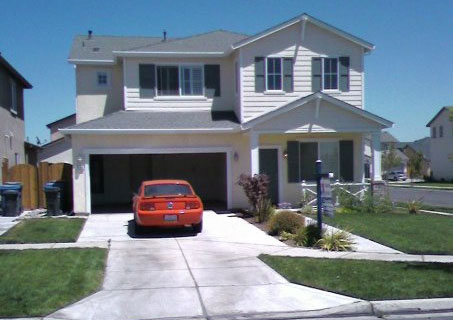
I am no longer going to screw around with the stock market. That $30,000 loss in January still stings a bit. That was supposed to be my financial shortcut to getting a house and it had the opposite effect.
My goal now is to work like crazy and build up exactly 2 years worth of living expenses, then throw more money at that house to cut the payments in half.


Comment below if you feel like congratulating me.
Thank You Notes
My question for you today is in two parts...
First of all, do you collect your customers' physical addresses?
Second, do you send your BEST customers handwritten thank you notes in the mail?
I do both -- as of earlier today.
(If you don't feel like reading the rest of this blog post... just scroll down and leave a comment answering those questions.)
To be honest, I only switched from the "no shipping" option on all my PayPal buttons... to optional shipping last year... and didn't lose any sales. Last month, I switched from "optional shipping" to required shipping on all my buttons, and didn't lose any sales! In fact, May 2008 was my best month to date.
Don't get me wrong. I am very much AGAINST ignorant order forms like JVManager that require customers to fill in their shipping information TWICE (once to get them in the order system, a second time into the payment processor).
There is no excuse for crap like that. Processors like PayPal will capture the address info and then save it in your logs or even pass it back into a script.
If someone is paying with a credit card, they have to type in their billing address anyway... and if they are paying directly out of a PayPal account, their primary shipping address is already PRE-SELECTED!
Every time I go to a seminar, the big boys who make $10,000+ per week always tell you to take your customers offline. They offer postcards, free CDs (where you pay shipping only), and big markup for those $997 packages with 30 DVDs that probably cost under $100 to produce.
You don't have to get all fancy like they do. In fact I just about guarantee you that if you try to set something up with Kinko's online, or some kind of automated postcard mailing service, that you will make everything way too complicated and get yourself confused.
Here is what I did. I downloaded the history of all my PayPal transactions of the past 6 months or so, onto an Excel spreadsheet.
I filtered the spreadsheet to include only those addresses that contained the phrase "United States" and sorted by highest purchase amount first.
After removing duplicates, I ended up with a list of about 50 Americans who bought a $30 or higher product from me in the last six months. There were many many people who paid less than $30, lived outside the United States, or just didn't provide any shipping information.
How pathetic is that? I average 566 sales per month with an average price of $19.06 per sale... I made 2,829 sales from January 1st to June 1st 2008... and I only ended up with about 50 decent physical leads.
Don't make the same mistake I did... require shipping on your PayPal account, even for online orders.
To write my thank you notes: I sat down on my couch to watch a movie and made use of some idle time. During that two hour movie, I wrote 50 personalized thank you notes.
I printed out that list of leads and a little bit of buying history from each person (because I funnel everything into a list, it is VERY rare for someone to only buy one product from me). I mentioned the product they bought, thanked them for being a loyal customer, asked them to take action on that product.
If I saw a trend in the products they bought from me (i.e. ONLY JavaScript how-to products, or ONLY the scripts themselves, or ONLY copywriting products) I would recommend something else they might like.
I wrote each of these in one of those fat little diary books, one thank you note per page, then hand-addressed each envelope, tore out each sheet of paper and stuck it in the envelope, added a stamp... then today, I stuck them all in a mailbox.
I did this all with mailing materials I had in my house. I didn't have to go outside, I didn't have time to talk myself out of it... I just needed a monotonous task to get me through a boring movie.
Watching the movie on its own would have been too boring... stuffing the envelopes would have been too boring... but I was completely happy doing both of those things at the same time.
So go ahead and check your order history (cross reference them with your mailing list to make sure they haven't unsubscribed) and write some thank you notes if you're going on a plane ride or watching a boring movie.
If you're one of those people who needs to add it as a routine to their schedule, just write and mail 4 handwritten thank you notes per day. Do it on a trial basis... you can stop after 30 days.
It has to be handwritten. I can't tell you how many pieces of mail I've thrown away just because they weren't handwritten.
They have to be mailed to your current customers ONLY. No cold mailing. I've thrown away plenty of those envelopes in my mailbox as well.
Even if those thank you notes don't bring in any more sales, it felt good to write them. George Bush Sr. supposedly wrote hundreds of thank you notes per day. He carried a box of thank you cards around with him and wrote thank you letters sometimes minutes after speaking with someone.
This was just a test. If the thank you note thing works out then I might send thank you's out to all my high-ticket customers, maybe throw in some Starbucks gift cards, hire someone to write them, who knows.
The important thing was: I took my customers offline, even if it was just a little bit.
Are you doing the same thing?
Please answer me in the comment form below because I need 10 comments to continue posting.
WordPress on Crack
The weekend before last, I launched WordPress on Crack... a set of video tutorials (5 hours worth) showing you how to write your own WordPress plugins... most of them easier to write than a standalone PHP script because you don't have to deal with most of the install, data storage, and templating issues that you'd normally deal with in PHP.
It also included three bonuses: Techie Howto WordPress by Joel Holtzman, Install SEO WordPress by Pawel Reska, and Advanced WordPress by Quentin Brown... also videos.
Total, the WSO grossed me over $8,000. Yes, $8,000 from one launch... that didn't involve any joint ventures or any advertising aside from a single forum post and a mailing to my list.
Here is a quick video from last Thursday showing the $7,000+ balance in my PayPal account (this is when the sale was still going on):
I sold 33 copies at 13.33 ($439.89), 33 copies at $16.66 ($549.78), 88 copies at $33.33 ($2,933.04) and 88 copies at $44.44 ($3,910.72). The last 12 discounted slots are selling at $66.66, so far 3 are gone ($199.98). That brings our grand total to: $8,033.41.
Take away a couple hundred dollars in PayPal fees, plus the cost of obtaining the resale rights to the bonuses, but you can add those back in when you accounted for "sidetracked" sales... getting my name out there caused people to buy a few more of my products.
"WordPress on Crack" made May 2008 my best month EVER! Even beating out June 2007 where I made $3,000 in a day. In May 2008, I made over $14,000 from PayPal (before fees). For the ENTIRE month, taking into account fees, Clickbank and day job income, I cleared over $16,000... in one month.
How did I do it? Easy. I acted like a marketer. I had something to market so I wrote a sales letter for it that explained everything (so many people post a WSO with nothing but a payment link... or even worse... a "buy me a beer" link... and wonder why it doesn't sell).
I created a product relevant to my e-mail list so I could market to that list. I gave them a unique offer -- the limited quantity -- which was something I actually tried last year with Push Button PHP and you know what? It pissed people off just as much then as it does now.
I had so much traffic going to that offer (opt-in list of 11,500 subscribers -- most of them paid) that the offer closed up quickly and people got angry because they couldn't get in.
Some of my subscribers told me they were unsubscribing for life because they were used to getting everything for $1.00 and could buy in at any time they wanted.
I had people saying I shouldn't resort to gimmicks because the product should sell on its own.
Guess what, most of the people who said that would never have bought anything from me over ten dollars, and have probably never done any serious marketing on the internet.
In 2008 alone, I've posted 31 special offers and earned $62,000. In the past 12 months? Fifty Warrior Special Offers!
I stick to one project at a time, I put myself under time constraints -- like having to get in my car to go to my day job or come off of my break.
I act like a real marketer... I try to over-deliver, and not in that generic cliched way. I added an e-book, scripts, and videos, and went out and bought resale rights to augment my original product.
I followed up with my list every day throughout the launch explaining what the price was that day. I hit them with a different angle every time and saved each mailing so I could use it as an automatic follow-up later. You know what people always say... it takes an average of 7 follow-ups to make a sale? How come almost NO ONE follows that rule?
What's your opinion on this situation? Was I wrong to limit the number of sales? Or was I a smart marketer by taking a WSO that would have normally made me $2,000... and turned it into $8,000?
Please take a moment to comment below.
Is Your Photo on Every Sales Letter?
Earlier this week I realized I had been doing something very stupid... leaving my photo OFF of my sales letter!
Seriously, you already go to the trouble of adding your photo to Facebook and MySpace...
Why Aren't You Doing the Same Thing on Your Sales Letter?
 I noticed this when I attended my first internet marketing luncheon. It was just a warrior lunchtime get together in New Jersey (I flew down from California to New York City for the weekend just to attend).
Immediately I recognized Mike Ambrosio and said hello to him... because his photo is on all of his sales letters! I also recognized Mike Merz, and of course when Mike Filsaime showed up, he was surrounded by so many groupies, no one could go talk to him. (So many Mikes.)
So... I knew who three people were, but the other 50-ish people were total strangers.
At the Warrior Event in Austin this April: I recognized Willie Crawford (his picture is EVERYWHERE) and Dr. Ron Capps the NicheProf, Marlon Sanders and Jason Fladlien... but again, that was about it!
Even some of the speakers were people I'd heard of... I'd read their sites, responded to them in forums, but didn't recognize them.
For that reason, I went through all of my sales letters this week and added my kisser to them.
On some sales letters I was able to do an "align=right" and place it to the right of the text, but sometimes I just gave up, centered that image, and placed it below my signature line at the bottom of the page.
Can You Please Do the Same on Your Sales Letter?
I'm not saying adding your photo will get you recognized instantly at real-world seminars. At the very least it will remind your potential customers reading that sales letter, that you're a real person.
You don't have to be wearing a suit or a hawaiian shirt... any picture will do.
- If it's a family photo, crop the image so it only shows you -- that way your kids aren't appearing on your sales letter.
- If you look like crap, crop the image even more so it only shows your head.
- If you think you're ugly, resize the photo of you down to 100x100 pixels.
- If you don't even have a digital camera, find a friend with a camera phone.
You have every reason to post your photo on a sales letter. Stop procrastinating and just do it.
Please comment below and tell me when you finally realized you needed to have your photo on your sales letters.
If you don't have your photo on there yet, add your photo to your sales page and post the URL here for all of us to look at.

